
Moving your website is like performing open-heart surgery on your digital presence. One wrong move can kill years of organic search equity in a single afternoon. If you have seen Organic traffic flatline after a launch, you know the stakes are high.
It is a massive risk for any business. A study by Search Engine Journal found that it took 523 days for a domain migration to recover. Even worse? 17% of sites in that study didn’t get their traffic back after 1,000 days.
That is why you need a real SEO migration strategy. This detailed plan helps preserve your search engine rankings during major site changes. It is not just about moving files. It ensures Google still knows who you are and where your content went.
Migrations are often necessary for growth. You might need a more secure SSL certificate, a better URL structure, or a more powerful CMS. Scaling up requires these changes. But every change is a chance for something to go wrong.
Without a strategic planning phase, you risk massive traffic drops. You might end up with broken internal linking or a tanked conversion rate. One technical error can wipe out your search engine visibility and ruin your entire quarter.
This guide provides a comprehensive SEO migration checklist. It will help SEOs, CEOs, and founders navigate the process without getting overwhelmed. We want to make sure you keep your search engine visibility and your revenue.
Highlights
- A strong SEO migration strategy protects rankings, backlinks, and conversions during a website move. Without it, traffic recovery can take months or even years.
- The three critical phases are planning, controlled execution, and disciplined post-launch monitoring. Skipping any phase increases risk.
- Redirect mapping is the most important safeguard. Missing or misconfigured 301 redirects are the leading cause of traffic loss.
- Full recovery typically takes 3–6 months. Permanent redirects must stay in place to preserve long-term link equity.
- Most migration-related traffic drops are preventable with proper testing, baseline benchmarking, and structured monitoring.
What is an SEO migration strategy?
An SEO migration strategy is a structured plan for moving a website without losing the authority it already earned.
The goal is to preserve and transfer SEO equity during major changes. That means protecting rankings, backlinks, organic traffic, and conversions while URLs, templates, or domains shift underneath.
Most migrations aren’t quick projects. For many sites, you’re looking at a realistic window of 3 to 6 months from kickoff to steady performance. The bigger the site and the more URLs involved, the longer it takes to stabilize.
An SEO migration strategy protects the signals search engines rely on. Things like URL structure, site structure, internal linking, canonical tags, metadata, structured data, and crawl paths. If those move carelessly, rankings move with them.
But this isn’t just technical. A migration is also a user experience decision. If the new site doesn’t load fast, buries key pages, or removes high-value content types, user engagement drops.
Research from Tooltester shows that the average page loads in 2.5 seconds on desktop. And 8.6 seconds on mobile. It also found that mobile users bounce at an average rate of 56.8%. This compares with 50% on desktop and 51.6% on tablets. When pages slow down, users leave. And when users leave, growth usually slows with them.
Key elements of an SEO migration strategy
A real strategy includes several moving parts. Each one protects a different piece of your SEO equity.
Pre-migration audit and baseline: Document organic traffic, keyword rankings, backlinks, and conversions. You need to know exactly what you’re protecting before anything changes.
URL mapping and redirect planning: Every important old URL must have a clear destination. Without proper 301 redirects, authority doesn’t transfer. It disappears.
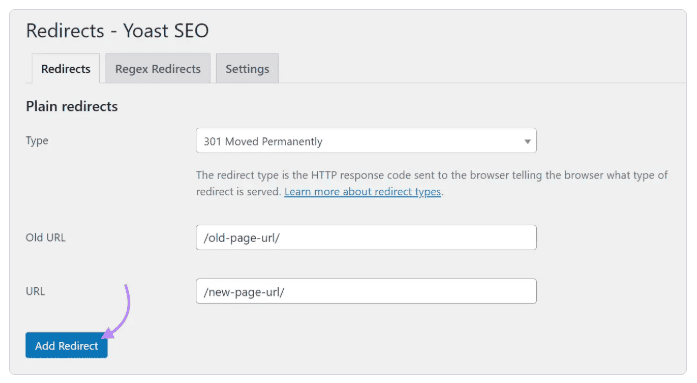
Technical SEO preservation: Canonical tags, metadata, schema markup, and internal links. If these aren’t transferred correctly, search engines receive mixed signals.
Content migration planning: Decide which pages stay and which retire. Removing the wrong page can erase years of earned visibility.
Testing protocols and launch coordination: Validate everything in staging. Confirm redirects, metadata, crawl paths, and tracking. Prepare rollback plans and assign ownership before launch day.
Post-migration monitoring: Migrations rarely settle on day one. Crawl errors, schema issues, redirect gaps, and tracking problems usually appear after launch. Monitoring ensures small issues get fixed before they turn into traffic loss.
Why migrations fail without a proper strategy
Migrations might not work when the team changes too many variables at once and does not protect SEO signals. Here are examples:
- URLs change without a complete redirect mapping
- Internal links and canonical tags still point to old locations
- Key content gets removed or rewritten without preserving search intent
- Robots rules or noindex tags block crawling by mistake
- The new site is slower, less usable, or harder to navigate
- Inadequate testing and poor rollback planning
The impact can be immediate and painful. In one of their Ask An SEO blog posts, Search Engine Journal discovered that an ecommerce company saw a 30% drop in traffic after a site migration. This can happen even if there’s a missing or incorrect 301 redirect. This can signal to Google that important pages have disappeared.
That’s why you have to:
- Benchmark performance before changes
- Migrate content and technical SEO elements without losing them
- Map old URLs to new URLs with 301 redirects
- Validate everything on staging
- Monitor indexing and traffic after launch
- And keep improving until the new site is stable
Make sure not to rush the process. A proper migration usually requires 3–6 months of planning, execution, and monitoring, especially for larger sites. When teams try to compress that timeline into a few weeks, critical steps get skipped.
Types of website migrations
Not every migration carries the same level of risk. Some migrations barely touch URLs, while others change everything at once.
Here are the most common types and what you should watch for.
Platform/CMS migration
A platform or CMS migration is when you move from one CMS platform to another, like a WordPress rebuild, a move to a headless setup, or a custom e-commerce platform switch.
One risk is that this could change the URL structure. Templates may handle metadata differently as well. And JavaScript dependencies can affect how content renders. Even tracking tools like Google Tag Manager might not work if they aren’t reconfigured properly.
From an SEO standpoint, stability matters more than aesthetics.
- URL patterns should stay consistent where possible
- Metadata needs to be transferred cleanly
- Internal page structure should remain logical
- The new CMS must generate clean, indexable HTML, not content that depends entirely on scripts
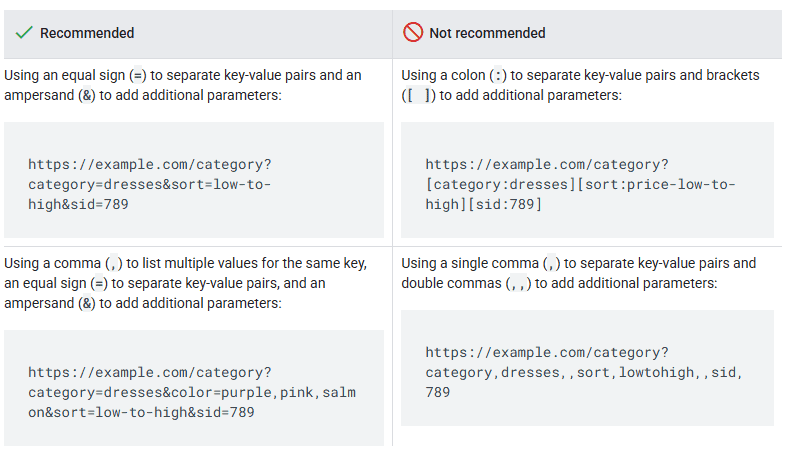
One common mistake is letting the new CMS auto-generate permalinks. If those rules change, thousands of URLs can shift overnight. And without control, you can quietly lose visibility.
Domain migration
A domain migration happens when your site moves from one domain to another.
Key risks include loss of domain authority signals, broken backlinks, and a messy indexing transition if redirects are incomplete.
The focus here is accuracy and control.
- Every old URL should point to its exact new equivalent using proper 301 redirects
- Canonical tags must reference the new domain
- The new property needs to be verified and monitored in Search Console right away
- High-value backlinks should be reviewed and updated when possible, rather than relying solely on redirects.
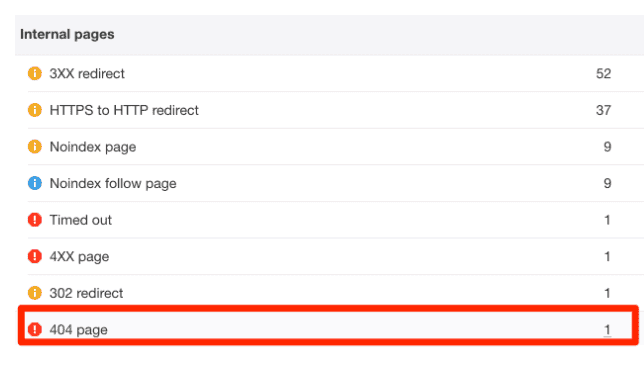
If your old domain had thousands of links, a missing redirect is not just a 404 error. It is a lost “vote” that can pull your rankings down.
Site redesign migration
A redesign migration changes layout, navigation, and page templates. Even if URLs stay the same, many SEO signals can change.
Key risks include internal linking changes, content moved below the fold, missing metadata, and page speed regressions that harm Core Web Vitals.
What matters here is preserving search intent and structure.
- Your top landing pages should remain strong and easy to reach
- Internal links should still support priority pages
- Page speed needs to be tested before and after launch
- Conversion tracking must be validated so revenue doesn’t quietly dip while traffic looks stable
For example, if your redesign removes category links from the header, it can change crawl depth and reduce internal link equity to important pages.
Protocol migration (HTTP to HTTPS)
A protocol migration moves a site from HTTP to HTTPS.
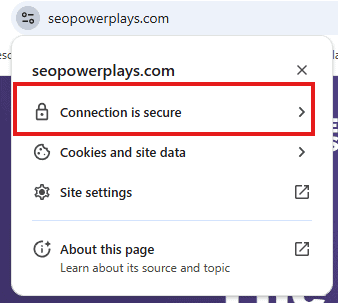
Key risks include mixed content warnings, redirect errors, and inconsistent canonical tags that confuse Googlebot.
Execution needs to be precise.
- Every HTTP URL should permanently redirect to its HTTPS equivalent using proper 301 implementation
- Internal links must be updated to point directly to HTTPS, not rely on redirects
- Canonical tags should also reflect the secure version from day one
If internal links still point to HTTP, every click creates an extra redirect hop. That slows crawling and wastes server resources unnecessarily.
Site structure migration
A site structure migration changes how content is organized. You might move from subdomains to subdirectories, change category paths, or rebuild navigation.
Key risks include URL mapping complexity, internal page structure changes, and content duplication when both old and new paths exist. When hierarchy changes, some pages end up buried deeper than before. Others become orphaned because internal links were never updated.
To protect performance, the new structure needs to follow a clear logic.
- Your URL mapping should reflect the revised hierarchy precisely
- Internal links must support that structure
- Updated XML sitemaps should guide search engines toward the correct paths
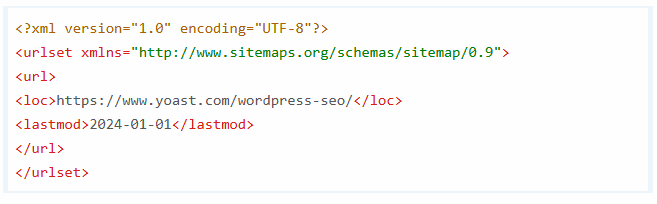
For example, if you consolidate blog categories, redirect each retired category to the closest relevant alternative rather than the homepage. That preserves context and authority.
International/Multi-site migration
An international or multi-site migration happens when you expand into new markets or consolidate existing ones. You might merge country domains, add new language versions, or restructure the organization of regional sites.
These migrations add complexity fast. Key risks include hreflang implementation mistakes, content duplication, and incorrect international targeting.
International targeting needs to be precise.
- Hreflang tags must be implemented correctly and consistently
- Language signals should match the intended audience
- Site structure should stay aligned across regions, so targeting feels intentional

For example, if you migrate your German site and forget hreflang tags, Google may serve the English version to users in Germany. That mismatch hurts visibility and the user experience.
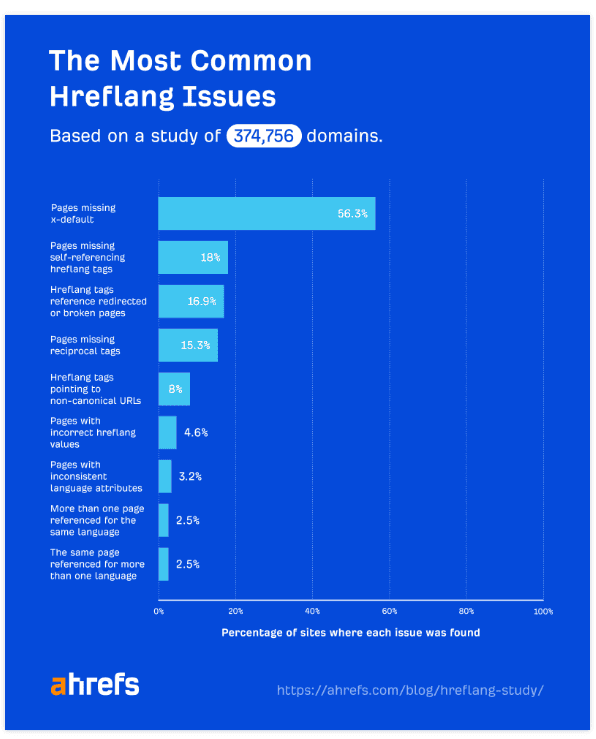
In fact, hreflang tag issues are common. In an Ahrefs study involving 374,756 domains, Ahrefs found that 70% of hreflang implementations had problems like incorrect values or referencing broken links.
Pre-migration phase: Planning and preparation
This is where you reduce risk before it becomes expensive. Here, we explain the four steps involved in detail.
Step 1: Establish your baseline
Before you change a single URL, document your current performance. You need a clear “before” snapshot to measure what happens after launch. You need this for benchmarking and decision-making.
Capture:
- Organic traffic by page and by section
- Keyword rankings for all tracked terms
- Backlink profile, including total links and referring domains
- Top-performing pages and their key performance metrics
- Conversion rates by landing page
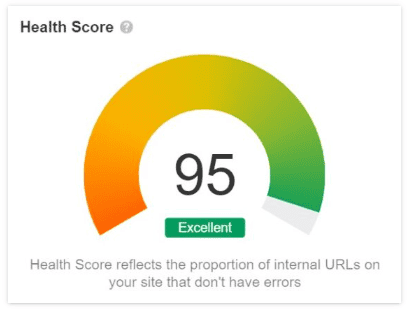
- Technical SEO health score
Export historical data from:
- Google Analytics 4 (at least 6–12 months of history)
- Google Search Console (queries, indexed pages, coverage reports)
- Rank tracking tools
- Crawling tools (such as Screaming Frog)
Save everything in a shared location and label it clearly. You’ll refer back to it often during post-migration monitoring.
Then prioritize. If a product category accounts for 30% of revenue, flag it as a high priority. Those pages deserve extra redirect validation, testing, and monitoring.
Step 2: Conduct a comprehensive site audit
Next, you need a full technical SEO audit of the existing site. It helps you discover what search engines already value, so you don’t remove or weaken it by accident.
Start by crawling the entire site and exporting every URL. You want a complete list. Not just the pages you think matter.
Your audit should include:
- Crawling the full site and documenting all URLs
- Identifying high-value pages based on traffic, rankings, and conversions
- Mapping the current URL structure and overall site architecture
- Documenting metadata, including titles, descriptions, and header tags
- Cataloging all existing redirects
- Reviewing the internal linking structure
- Identifying all indexed pages in Google Search Console
- Documenting structured data and schema markup implementations
- Noting technical elements such as canonicals, hreflang tags, and robots.txt rules
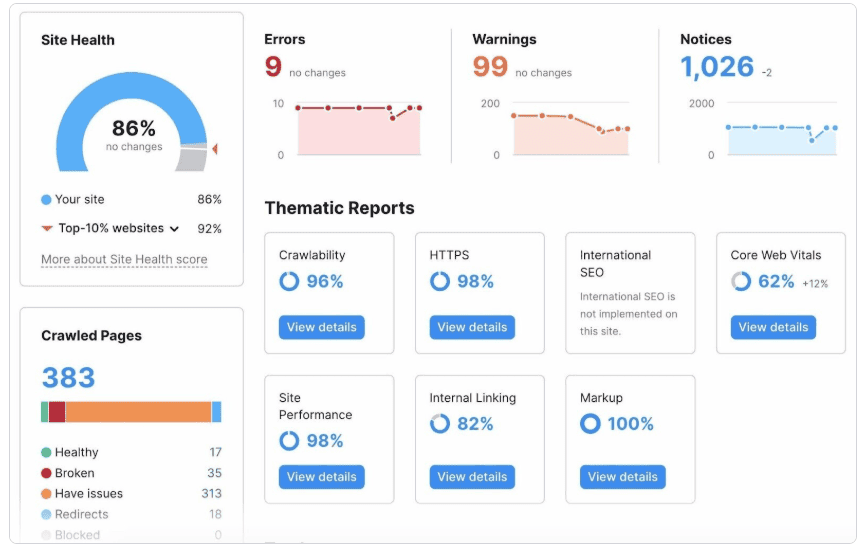
All of this should feed into a master spreadsheet. That spreadsheet becomes your content inventory and your source of truth during the migration.
Treat this audit as part of the migration project. The insights you uncover here directly shape your redirect mapping and content decisions.
For example, you might discover that a “thin” blog post drives a large share of organic traffic because it ranks for a strong keyword. Without this audit, you might have removed it.
Step 3: Create URL mapping document
Step 3 is the heart of your redirect strategy. And it involves protecting your authority.
Your mapping should:
- Include every URL on the site
- Include parameters and query strings if they are indexed
- Identify consolidated pages (many-to-one)
- Flag pages being split (one-to-many)
- Mark the pages being removed and choose the best alternative
- Prioritize high-value pages for extra attention
You can use a spreadsheet to document all this. Include columns for:
- Old URLs
- New URLs
- Redirect type (301, or 410 for permanently removed content)
- Page traffic or business value
- Status (mapped, needs decision, removing)
- Notes for context
Get stakeholder approval before you move forward. If there’s disagreement about where a page should redirect, resolve it now. Not on launch day.
Large sites may need workflow automation. Coordinating thousands of URLs across teams can quickly get messy without structured tracking. But an enterprise SEO platform can help manage inventories, approvals, and validation.
Remember what redirects are really protecting: Your backlink equity. Before launch, pull a list of pages with the most referring domains, strongest organic traffic, and highest conversion rates. Mark them as priority URLs in your mapping sheet. During testing, validate those redirects manually and in a crawler.
That extra discipline prevents silent losses where rankings drop weeks later, and no one knows why.
If you need to explain this to non-SEOs, share a short reference on white hat link building techniques. It helps stakeholders understand that link equity is a long-term asset, not a vanity metric.
For example, if you are removing a feature page, redirect it to the most relevant new feature page, not to a generic pricing page.
Step 4: Plan technical SEO transfer
This is where many migrations quietly fall apart. Templates can change, and fields can get renamed.
You need to document how every critical technical SEO element will transfer from the old site to the new one.
At a minimum, plan for:
- Title tags and meta descriptions
- Header tag structure (H1 to H6)
- Image alt text
- Canonical tags
- Structured data and schema markup
- Hreflang tags (for international sites) if applicable
- XML sitemap
- Robots.txt directives
- Internal linking structure
- Page speed optimizations and Core Web Vitals
- Mobile-friendliness and responsive design patterns
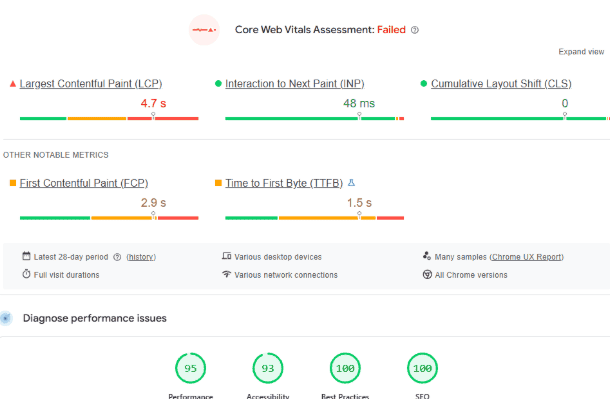
Screenshot provided by the author
Treat this like a controlled process. Create a template or checklist that ensures each element is reviewed and validated before launch. The goal is no “we thought that transferred” surprises.
If your migration involves WordPress (or you’re moving to it), lock down the technical basics early. That includes permalink rules, template fields for titles and meta descriptions, and who owns the SEO plugin configuration. Create a simple “WordPress CMS Guide” to help align the team on what needs to be “done”. This ensures they do not miss anything.
Here’s a tip. Make sure to assign ownership for each technical element you build. Someone should be responsible for redirect logic. And someone else should own canonicals and metadata. This ensures that everyone knows what they’re assigned to do, and they can catch issues early.
For example, if your old site used custom schema markup on product pages, make sure the new template outputs the same rich result signals. A simplified version can reduce visibility even if rankings hold steady.
Migration execution phase
Execution is where your preparation turns into action. If the pre-migration work was thorough, this phase should feel structured and predictable.
Step 5: Implement on the staging environment
Before anything goes live, you need a staging environment that mirrors production as closely as possible. This is where you find problems before search engines do.
Your staging setup should:
- Use the same server configuration as production
- Include all new URLs and redirect rules
- Contain fully migrated content and metadata
- Apply proper noindex directives to prevent indexation
- Be password-protected or blocked from search engines
This allows complete testing before going live.
The closer staging is to production, the more reliable your testing becomes. Ideally, it should be nearly byte-for-byte identical to what will launch.
For example, if your staging site loads faster because it is hosted on a different CDN or has fewer scripts, your performance testing will be misleading.
Step 6: Test everything thoroughly
This is the “boring” work that saves traffic. Start with a short intro to the tests, then run them one by one.
Redirect testing
Test every redirect in your mapping document. Do not rely on spot checks alone.
Focus on:
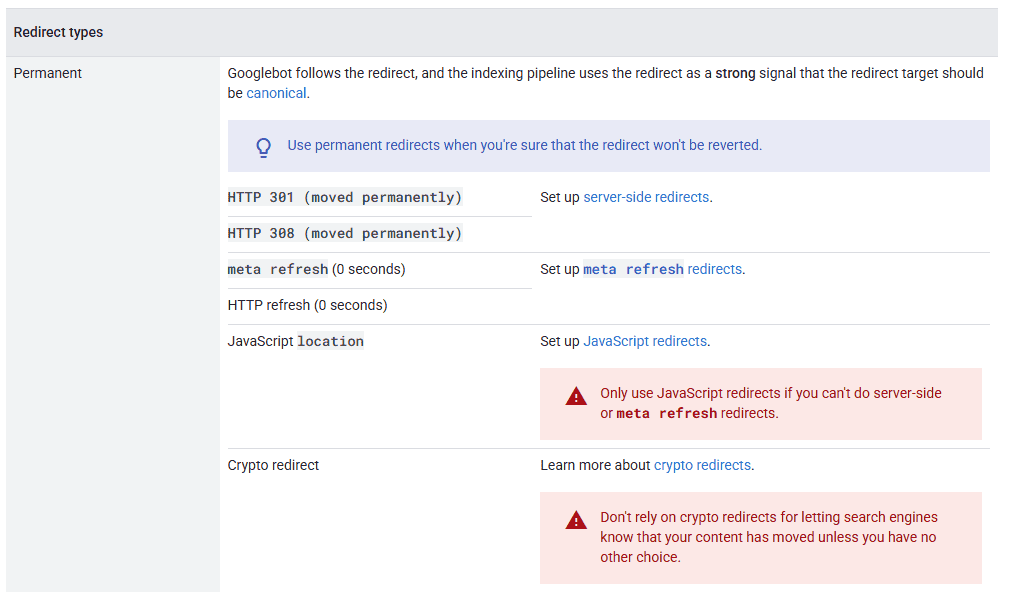
- Verifying 301 status codes (not 302)
- Avoiding redirect chains by redirecting directly
- Confirming no redirect loops
- Testing with multiple tools (like Screaming Frog and redirect checker tools)
Redirect chains may look harmless, but they dilute authority and slow crawling. If an old URL first hits a temporary page before landing in its final location, that friction adds up.
A helpful reference point is Google’s Redirect and Google Search Guide. It provides more detail on how you should handle permanent redirects.
Technical SEO verification
Next, crawl the entire staging site like a search engine would. Treat it as if it were already live.
Validate:
- Title tags, meta descriptions, and header structure
- Canonical tags pointing to the correct new URL
- Structured data using validation tools
- Internal links updated to new paths
- Mobile responsiveness across templates
- Page speed and Core Web Vitals
If canonicals still reference old URLs, Google may continue to rank the old version even after the new site is live. This can delay recovery.
Content quality check
Now step away from the crawler and review key pages manually.
Spot-check templates and high-value pages for:
- Broken layouts
- Missing content blocks
- Images that fail to load or have lost their alt text
- Forms and interactive elements that don’t work
- Conversion tracking errors
Automation helps with structure. But humans evaluate the experience. A broken checkout flow can damage revenue even if traffic remains stable.
Create a testing checklist
Document every test performed. Record issues found, how they were resolved, and who approved each fix. Then get a formal sign-off before launch.
A launch checklist with 30 items might look overwhelming until you use it to prove what happened when a stakeholder asks why traffic went down.
Step 7: Prepare launch day coordination
Now comes the project management part. This is important for SEO as rushed launches can create technical vulnerabilities.
Build a launch timeline that includes:
- An off-peak traffic window
- Assigned responsibilities across dev, SEO, and content
- A clear communication protocol
- A rollback plan in case of critical issues
Everyone should know their role before anything goes live. Make sure all key stakeholders know about the launch window and prepare a live monitoring dashboard. Also, have your dev, content, and SEO teams on standby.
This is not the time for someone to be unreachable. Actually, it helps to have a list of your emergency contacts.
If you’re migrating an e-commerce site, increase your vigilance. Product feeds, structured data, checkout flows, and analytics events introduce more complexity. More moving parts mean more potential failure points.
For example, if DNS changes before redirects are active, crawlers can encounter a wall of 404 errors during the most sensitive window.
Step 8: Execute migration
This is where you follow your launch checklist as is.
Your execution steps should include:
- Taking a final backup of the old site
- Implementing all redirects on the live server
- Switching DNS or deploying the new site
- Removing staging noindex tags
- Submitting the new XML sitemap to Google Search Console
- Updating robots.txt if needed
- Monitoring server logs for errors
- Manually checking high-priority sample URLs immediately after launch
If URLs are changing, Google’s How to move a site post is worth reviewing. It outlines how to support a smooth indexation transition and reduce confusion during the move.
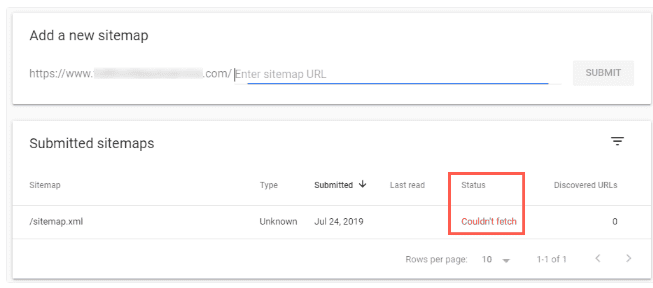
Small oversights can cause real delays. For example, if you submit your new XML sitemap but forget to unblock it in robots.txt, Search Console will report errors. Discovery slows down. And recovery takes longer than it should.
Post-migration phase: Monitoring and optimization
The site launch is the beginning of SEO work. The goal is to catch issues early and optimize until performance stabilizes.
Step 9: Immediate post-launch checks
The first 24 hours are about fast verification, not deep analysis. You’re confirming that the foundation holds.
First 24 hours: Critical monitoring
Start with redirects and technical errors.
Verify on the live site:
- Test a sample of high-value URLs manually
- Run a full crawl of the live site
- Check for 404 errors in server logs
- Monitor 500 errors or unexpected server issues
You’re looking for issues. If something critical fails, you want to catch it immediately.
Next, move to Google Search Console.
Confirm that Google can see the new structure:
- Submit the updated XML sitemap
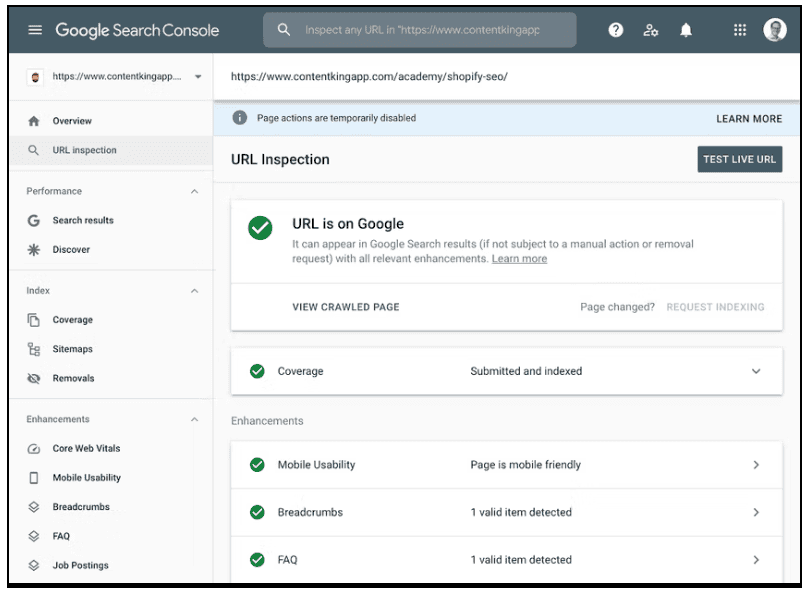
- Use the URL inspection tool on key pages
- Request indexing for priority URLs
You’re helping search engines understand the change as quickly as possible.
Then check your analytics setup.
Validate:
- Traffic is being recorded correctly
- Goal and conversion tracking are working
- Source and medium data appear accurate
It’s common for tracking to break during migrations. If analytics looks normal but Search Console clicks drop, you may have a tracking issue masking an indexing problem.
Finally, monitor performance signals.
Keep an eye on:
- Page load speeds
- Server response times
- User-reported issues
The faster you detect issues, the easier they are to fix.
Step 10: Week 1 monitoring
Week one is where small problems can turn into bigger challenges if you ignore them.
Run daily checks on the metrics that matter:
- Organic traffic levels (some fluctuation is normal)
- Crawl errors in Google Search Console
- 404 errors and fix them immediately
- Rankings for top keywords using your rank tracker
- Indexation status, including old URLs dropping and new URLs being indexed
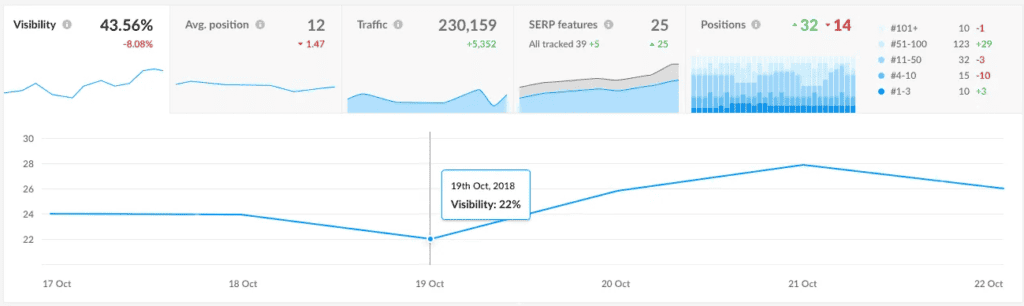
You’re looking for patterns. A slight dip can be normal. But a noticeable decline needs action.
When issues appear, fix them fast:
- Correct broken redirects
- Add missing redirects for URLs returning 404s
- Resolve crawl errors
- Fix technical issues that emerge, like canonical tags or internal linking gaps
Document every issue and update stakeholders with short daily reports.
Set up a shared dashboard that focuses on essentials. Keep it simple on purpose. Track top landing pages, crawl errors, indexation shifts, and priority keywords.
If only low-value pages lose rankings, prioritize fixes for high-revenue landing pages first. Stability starts with what matters most.
Step 11: Month 1-3 ongoing monitoring
This is where you confirm recovery and improve weak areas. You will do weekly monitoring and monthly deep dives.
Weekly monitoring tasks
Each week, compare performance against your pre-migration baseline.
Focus on:
- Total organic traffic
- Traffic by top landing pages
- Keyword ranking changes
- Goal completions and conversions
Next, track the indexation transition:
- New URLs are being indexed
- Old URLs dropping from the index
- Coverage reports in Search Console
Both sides matter. If old URLs remain indexed too long, or new ones aren’t picked up, you may have redirect or crawl issues.
Backlinks deserve ongoing attention.
- Track referring domains and updating links
- Reach out to high-value sites to update important links
- Monitor for broken links or negative SEO signals (like spammy backlinks or link farms)
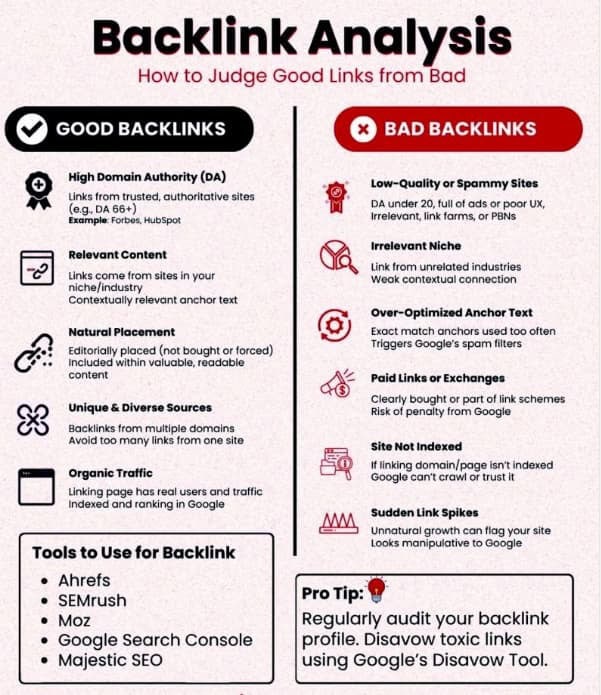
When asking sites to update links, be specific. Focus first on the pages you mapped during migration, especially high-value or “power pages.” That’s where link equity compounds. (This Outreach Link Building guide has really helpful tips!)
If outreach feels messy, build a simple repeatable process. Target quality over volume.
For example, if a respected industry blog links to your old resource page, ask them to update the URL. Confirm the redirect is working as a safety net.
Monthly deep-dive analysis
Once a month, step back and look at the bigger picture.
Run a comprehensive performance review:
- Calculate traffic recovery percentage
- Evaluate ranking improvements or losses
- Analyze page-level performance
- Conduct technical health checks
This is where you identify persistent issues. Maybe one section hasn’t recovered. Or one template is underperforming. Those become optimization targets.
If performance improves, you may also see gains in engagement and conversions. Improvements in speed and user experience can translate into measurable business impact over time.
Step 12: Long-term optimization
After the first few months, shift from “fixing issues” to making the new site stronger than the old one.
Full recovery typically takes 3–6 months. For larger or more complex sites, it can take even longer. This is normal. What matters is steady improvement.
From months 3–6 and beyond:
- Continue monitoring until traffic stabilizes or exceeds your pre-migration baseline
- Keep all old redirects in place permanently — never remove them
- Update internal documentation with the new URL structure
- Create a post-migration report outlining performance outcomes
- Document lessons learned for future migrations
- Celebrate the win with your team
Permanent redirects are key here. Old backlinks, bookmarks, and cached URLs will continue sending traffic for years.
This is also the best time to scale. If the migration improved speed, templates, or workflows, use that advantage. Strengthen internal linking. Expand high-performing pages. Improve schema markup. And refine how you measure performance.
For example, if your new category pages convert better, expand them with richer content types and better schema markup.
Common SEO migration mistakes to avoid
This section is your “do not do this” list. Most traffic declines stem from a few predictable issues, not from Google’s unpredictability.
Critical errors that cause traffic loss
- Missing or broken redirects (#1 cause of migration losses)
- Changing URLs without redirects (treating it like a “fresh start”)
- Using 302 instead of 301 redirects (failing to pass full link equity)
- Redirect chains (old URL → temporary URL → new URL, which dilutes authority)
- Removing high-value content (deleting pages that drove traffic and conversions)
- Inadequate testing (launching without full validation)
- No baseline data (having no “before” metrics to measure recovery)
For example, if you launch without proper redirect mapping, search engines and users hit 404 errors. Link equity built over the years disappears in days.
Planning and process failures
These mistakes usually look like “project management problems,” but they become SEO problems fast:
- Rushing the timeline (migrations need months, not weeks)
- Poor URL mapping (incomplete or inaccurate old-to-new matches)
- Ignoring stakeholder input (bringing SEO in too late)
- Insufficient resources (understaffing a complex migration project)
- No rollback plan (having no safety net if critical issues arise)
For instance, if SEO is brought in after the design is locked, you often end up with templates that do not support metadata or schema markup properly.
Technical oversights
These are the quiet mistakes that show up after launch:
- Forgetting to remove noindex tags (staging directives left on live pages)
- Breaking internal links (links still pointing to retired URLs)
- Metadata not transferred (losing optimized titles and descriptions)
- Structured data lost (schema markup missing on the new site)
- Mobile issues (new design not really mobile-friendly)
- Page speed regression (new site is slower than the old one)

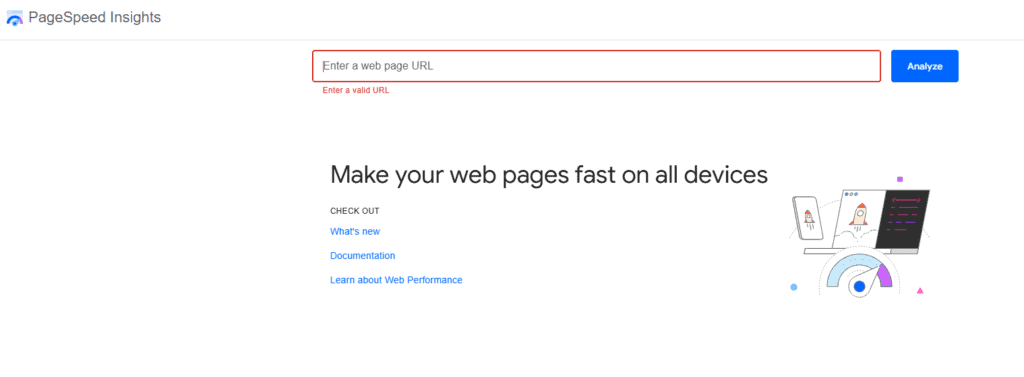
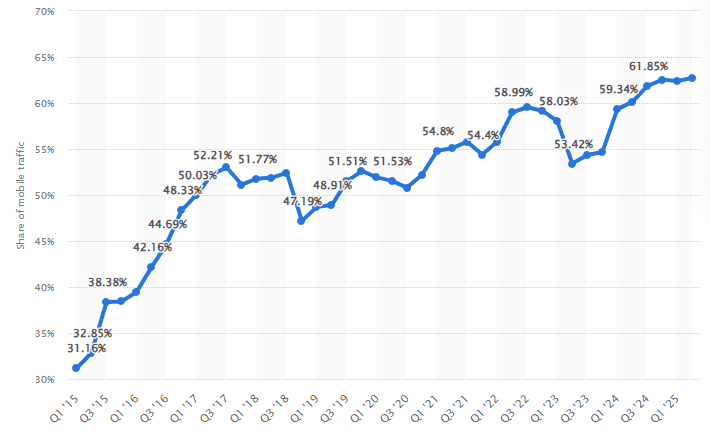
For example, if your site redesign adds heavy scripts, your PageSpeed Insights scores can drop, and so can user engagement. This shows how important it is to optimize your site for mobile users. (Considering that 62.5% of the world’s website traffic comes from mobile users, according to Statista research).
One simple way to reduce risk is to maintain a consistent technical validation routine. Many teams treat the migration as a one-off, but sites that keep improving repeat the audit and monitoring cycle every quarter.
Post-launch neglect
This is the quiet killer, because it feels like the migration is “done.”
- Insufficient monitoring (not watching performance closely)
- Slow issue resolution (letting errors sit for weeks)
- Removing redirects too early (migration redirects should remain permanent)
- Not updating backlinks (missing opportunity to update external links)
If you remove redirects after a month because “traffic looks stable,” you risk delayed losses. Old links and bookmarks don’t disappear overnight.
When you do update backlinks, pay attention to how the link sits in the page. A link buried in a footer is not the same as a link inside a relevant paragraph. If you want a quick feel for what “good” looks like, skim a few contextual link building examples and mirror the same natural placement when you ask partners to update URLs.
The good news? Most of these mistakes are preventable. Clear checklists, consistent dashboards, and disciplined monitoring stop small issues from becoming long-term traffic problems.
Conclusion
A site migration is high-risk. But with the right SEO migration strategy, you can protect search engine visibility, preserve conversions, and often come out stronger than before.
The pattern is consistent:
- Plan and benchmark first
- Execute with staging and thorough testing
- Monitor and optimize until performance stabilizes
Start planning at least 3 to 6 months before launch if the site is complex. Expect a recovery period, but do not treat traffic drops as “normal” if you see clear technical problems. Most losses are preventable with good preparation and fast fixes.
One rule deserves special emphasis: Keep your redirects permanent. Old backlinks, bookmarks, and cached URLs can send traffic for years. Removing redirects too early can undo months of recovery.
If you’re preparing for a migration, follow the comprehensive checklist outlined in this guide and share it with your team.
And if you want to keep improving your technical SEO skills and processes, subscribe to SEO Power Plays to learn how to level up your SEO with smarter systems and execution.